Microsoft Adaptive Mouse: When Accessibility Becomes Modular and Customizable Design

In the world of technological accessibility, there's a crucial difference. On the one hand, adapting a product designed for the "average user." On the other, designing from the outset for the real diversity of people . Microsoft Adaptive Mouse was born precisely from this second philosophy: a device designed to adapt to the user , and not to ask the user to adapt to the device.
Developed by Microsoft in collaboration with the disability community, this mouse is a concrete example of accessibility by design , applied to everyday hardware.

A “core” mouse that changes shape (and function)
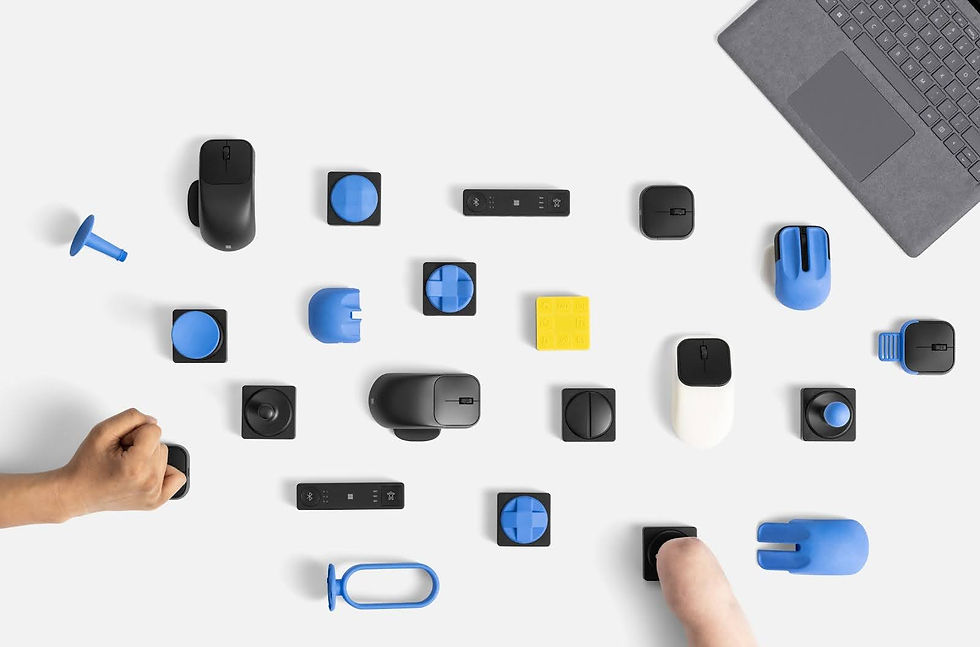
The Microsoft Adaptive Mouse isn't a traditional mouse. And it doesn't even try to look like one. It's a compact central module that can be used as is, or transformed using modular components designed to be swapped out and customized:
rear tail for a more stable grip
Thumb rest , positionable and ambidextrous, 3D printable components , with official files released by Microsoft

This modularity allows you to obtain different configurations starting from the same device:
different grips
custom angles
wider or thinner support surfaces based on strength, mobility, posture, or fatigue.
It's not just about comfort: for many people, it's the difference between using a computer independently and having to rely on alternative solutions.
Accessibility that evolves with the person
One of the most innovative aspects is the openness to 3D printing . Microsoft provides official files for creating alternative queues, allowing:
progressive adaptations over time
tailor-made solutions for specific motor needs
experimentation without having to purchase new devices
This is a rare approach in mainstream hardware, and particularly important in accessibility, where needs are not static and can change .
Ambidextrous, lightweight, designed for multi-device environments
From a practical point of view, the mouse integrates features designed for real life:
right or left handed use
very low weight , useful in case of fatigue or tremors
Bluetooth or USB-C connection
ability to connect up to 3 different devices and switch between them via a dedicated button
This is a significant detail for those who work between computers, tablets, or different environments and need to reduce movement, reconfigurations, and cognitive load.

Software and customization
On Windows, the mouse can be configured via the Microsoft Accessory Center , which allows you to:
customize button functions
adapt the device's behavior to your habits
The mouse is also compatible with macOS, iOS, Chrome OS, and Android. However, the initial advanced setup is only available on Windows, which is something to consider in classroom or cross-platform settings.
Who is it really useful for?
The Microsoft Adaptive Mouse is intended for a wide audience, but is particularly useful for:
people with reduced mobility or limited hand strength
those with tremors or difficulty gripping
users who alternate use between hands
those looking for a more inclusive and sustainable workplace
It is not a “special mouse”, but a tool that expands the possibilities of access to technology.
Accessibility as a design choice
The value of this product isn't just technical. It's profoundly cultural.
Microsoft has stated that it follows the principle of "nothing for us without us ," directly involving people with disabilities in every phase of the design process. The result is an object that does not medicalize the user, but normalizes diversity as part of the everyday experience .
And that's exactly the kind of accessibility we need: not niche solutions, but inclusive products that improve everyone's experience .
Why we're talking about the Microsoft Adaptive Mouse on ForAllWe
Because accessibility isn't just about those with a recognized disability. It's about anyone who wants to use technology in a more humane, flexible, and respectful way. The Microsoft Adaptive Mouse demonstrates that design, innovation, and inclusion can coexist. And, more importantly, work in practice.
Discover the product, accessories and complete specifications on the official Microsoft page
For 3D printable accessories, please visit the main page HERE


Comments